Artificial Intelligence
Building Morningbrew: How I Turned a Solo Side Project into an AI-Powered Product Team
AI /Side Project /Agentic Pipeline /Personal Brand
The project
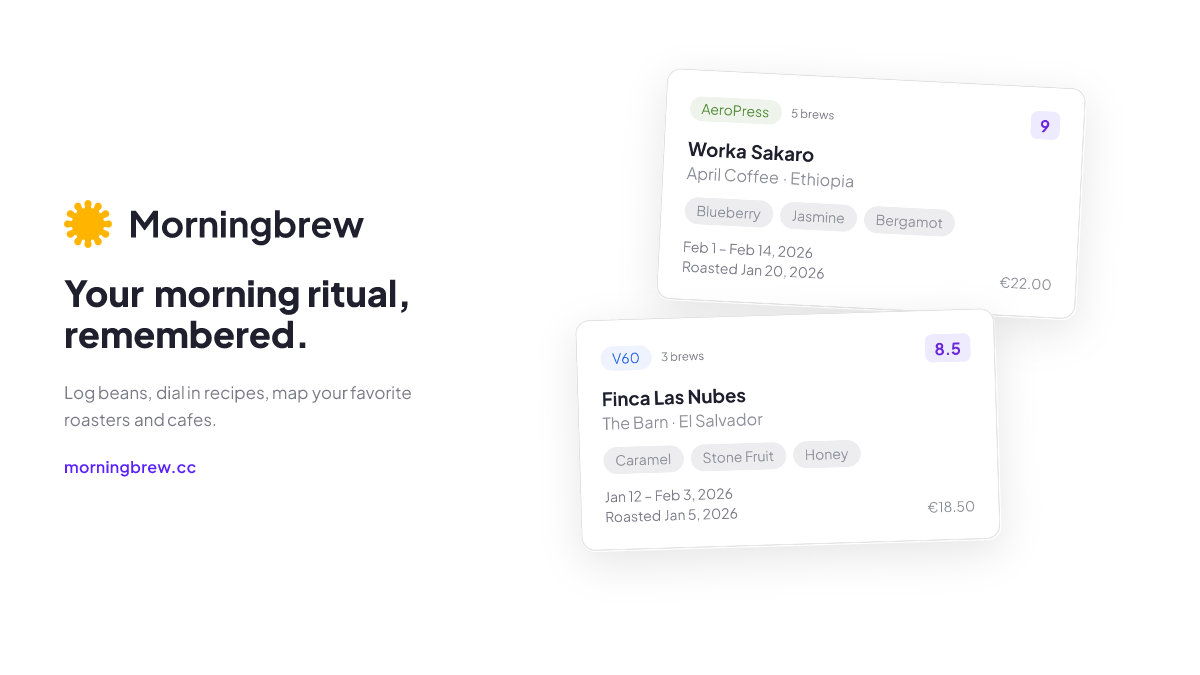
Morningbrew is a specialty coffee journal and roaster map. You log the beans you buy, record how you brewed them, rate the result, and build a personal map of roasters and cafes worth knowing. It lives at morningbrew.cc.
I designed and built the entire thing. Next.js, Supabase, Mapbox, Cloudflare Workers. 100+ coffees tracked, 40+ roasters, 50+ routes, 49 database migrations, a custom design system with dark and light mode, and a CI/CD pipeline that runs lint, tests, and deploys on every push.
This is not a prototype. It is a production app with auth flows, email systems, security headers, and legal compliance. I use it every morning to log my coffee.
But the interesting part is not what I built. It is how.
The problem with building alone
When you are the only person on a project, things slip. Not the obvious things. The subtle ones. A button label that does not match the voice guide. An RLS policy that works for the happy path but breaks when a user has no data. An empty state that says “No results” when it should say “Log your first coffee.”
Teams catch these things because different people look at work from different angles. A designer sees the interaction. A copywriter sees the tone. A QA engineer sees the edge case. A security engineer sees the attack surface.
I wanted that coverage without the team.
The agentic pipeline
I built a system where Linear tickets flow into Claude Code agents, each playing a specialized role. The setup has three layers.
Linear as the backbone. Every piece of work starts as a Linear issue. When an issue is ready for implementation, I add a “Claude Task” label. That triggers a webhook that kicks off Claude Code. No copy-pasting prompts. No manual handoff. Label the ticket and let it run.
Obsidian as the knowledge source. All product decisions, data models, design tokens, copy guidelines, and architectural context live in my Obsidian vault. The agents pull from this vault as their single source of truth. When the UX Writer checks the voice guide before editing a label, it is reading the same document I wrote months ago. Decisions stay consistent because the source of truth is always current.
Specialized agents as the team. Each agent lives as a markdown file in .claude/agents/. Each one has a defined persona, explicit principles, and structured output formats. There are 10 of them.
The original four handled the engineering side: an Engineer for architecture and implementation, a Product Manager for scope and prioritization, a QA Engineer for testing and edge cases, and a Security Engineer for threat models and compliance.
Then I added the other half of a product team: a Product Designer for UI decisions and design system consistency, a UX Writer for microcopy and voice, a UX Strategist for connecting design decisions to business outcomes, an Information Architect for navigation and taxonomy, a User Researcher for interpreting feedback, and a Test Engineer that writes failing tests before any code exists.
Why constraints matter more than capabilities
The key insight is not that AI can play these roles. It is that giving agents constraints makes them dramatically more useful.
A generic “review this code” prompt gets generic output. An agent with a defined persona, explicit principles like “prefer simple, boring solutions over clever ones,” and structured output formats produces work you would trust in a pull request.
The Product Designer checks existing design tokens before proposing new colors. The UX Writer reads the Copy and Voice doc before touching a label. The Security Engineer starts every review with “what is the worst thing that could happen?” These are not generic assistants. They are specialists with context.
The memory file
The part of the setup nobody asks about but probably matters most: the memory file.
When something goes wrong, it gets logged in .claude/memory/learnings.md. What went wrong, why, and what test was added to prevent it. Next time Claude works in that area, it checks the file first.
A few real examples:
Login kept getting stuck on a loading spinner after an auth change. The agent optimized one path without realizing it blocked another. Logged the coupling issue, added tests for both paths. It has not broken since.
An RLS policy pattern kept getting generated wrong. One entry in the learnings file fixed it across all future work.
A copy tone issue where the agents kept writing too formally. Logged the correction with examples. Now they match the voice guide.
The CLAUDE.md file gets all the attention. It is the operating manual that tells agents what conventions to follow and which docs to check. But the memory file is what turns a tool into a teammate. One remembers instructions. The other remembers experience.
The workspace structure
The full setup looks like this:
morningbrew/
├── CLAUDE.md               ← operating manual
├── .claude/
│   ├── agents/             ← the team
│   │   ├── engineer.md
│   │   ├── product-manager.md
│   │   ├── designer.md
│   │   ├── ux-writer.md
│   │   ├── qa-engineer.md
│   │   ├── security-engineer.md
│   │   ├── ux-strategist.md
│   │   ├── information-architect.md
│   │   ├── user-researcher.md
│   │   └── test-engineer.md
│   └── memory/
│       └── learnings.md    ← mistakes → tests
The CLAUDE.md file is five sections and nothing else: project context, conventions, commands, workflow, and architecture. I tried the “everything” approach first. 300+ lines. The agent treated it like a terms-of-service page. It skimmed. More context made it worse. The leaner version changed behavior.
Claude Code reads CLAUDE.md files in layers. A personal file at ~/.claude/CLAUDE.md provides defaults. The project file sets team conventions. Directory-specific files override the above. Inner layers win. It works like CSS specificity for AI context.
What the pipeline actually caught
I ran a full audit where all 9 specialist agents reviewed the product in parallel. The interesting part was not the scores. It was the gaps they surfaced.
API routes lacked request body validation. Analytics was limited to pageviews with no interaction tracking. There was no explicit user research infrastructure. The QA agent caught an RLS policy gap. The UX Writer flagged inconsistent empty state copy across three different pages. The Security Engineer noted a missing rate limit on a public endpoint.
These are the kinds of things a solo builder misses because they are not blocking anything today but will block everything tomorrow. And they are exactly the kinds of things that a second pair of eyes catches in a team environment. The agents provided that second pair of eyes, nine times over.
The code generation itself is the easy part. The review layer is where the real value lives.
The scope
The app shipped with 50+ routes across four route groups, 76 component files organized by domain, and 25 custom data-fetching hooks. The database grew to 49 migrations totaling 9,013 lines of SQL with row-level security on every table. Content seeded at launch: 100+ coffees, 40+ roasters, 12+ cafes.
Testing covers 88 unit test files, dedicated RLS integration tests, and 6 end-to-end suites. The design system uses custom HSL tokens with 8 color scales, full dark and light mode, and 7 animation keyframes. The email system runs a 5-phase architecture with HMAC-signed unsubscribe tokens, fully RFC 8058 compliant.
All of it built and shipped by one person and 10 agents.
What I learned
Building solo with AI does not reduce the need for design judgment. It amplifies it. When code is cheap to generate, the bottleneck shifts from implementation to decision-making. Which feature to build. Which edge case to handle. Which trade-off to accept. Every hour I spent on competitive analysis, data model design, and voice guidelines saved multiple hours of rework.
AI agents are most effective as specialized reviewers, not general-purpose builders. The code generation is the easy part. The hard part is catching what a single person would miss: the inconsistent label, the untested edge case, the security header that is not blocking anything yet.
The gap between “works” and “shipped” is larger than most AI-built projects acknowledge. Morningbrew has HMAC-signed email unsubscribe tokens because email compliance matters. It has CSP headers because security matters. It has 88 test files because reliability matters. These are not exciting features. They are the difference between a side project and a product.
The best engineers I have worked with were not the ones who never made mistakes. They were the ones who never made the same mistake twice. Turns out you can teach that to an AI. You just need to give it a notebook.
The stack
The frontend runs on Next.js with the App Router, written in TypeScript and styled with Tailwind CSS using custom HSL design tokens. Data lives in Supabase: Postgres, Auth, Storage, and row-level security. The interactive map uses Mapbox GL JS with Supercluster for marker clustering. Everything deploys to Cloudflare Workers via OpenNextJS for server-side rendering.
On the workflow side, Linear handles project management, Obsidian holds all product knowledge, and Claude Code runs the 10 specialized agents. Analytics use Umami for privacy-first visitor tracking.
Morningbrew is live at morningbrew.cc. The agentic pipeline is a replicable pattern for solo builders and small teams who want the rigor of a cross-functional team without the headcount.